

Print File Help
Using Canva? Read our Canva print guide / Using AI images? Read our AI print guide / Not sure what bleed is? Read our bleed guide
What is bleed in printing?
Bleed is the extra image area that extends past the trim edge so your printed piece cuts cleanly with no white borders.
If your design has colour, images, or background patterns that go all the way to the edge, you need bleed. Without bleed, tiny shifts during trimming can leave unwanted white lines along the edges of your printed piece.
Imagine painting a wall and stopping exactly at the edge of the tape. If you miss by even a tiny amount, the old colour shows through. Bleed prevents that kind of edge problem in print.
How much bleed do you need?
For many standard print pieces, bleed is typically 1/8 inch beyond the final trim size on each side, though exact requirements can vary by product. If you are unsure, ask Parks West before sending your file.
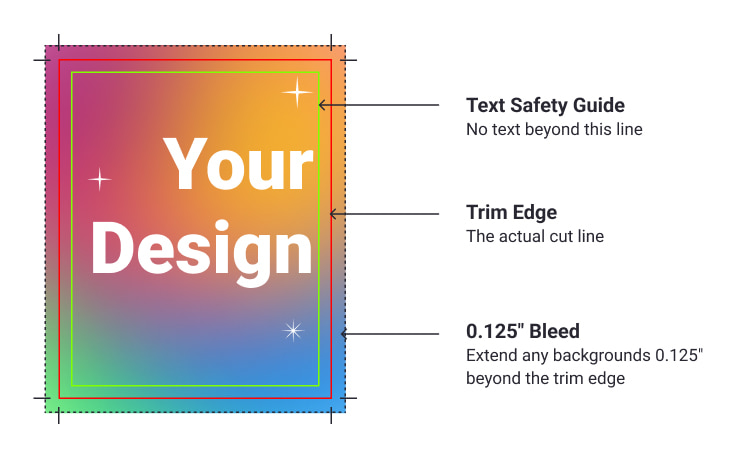
What is the safe area?
Bleed is not the same as the safe area.
Bleed goes outside the trim edge and gets cut off
Safe area is inside the trim edge and keeps important text and logos away from the cut line
That means:
backgrounds should extend into the bleed
important content should stay inside the safe area
Common mistake
A very common mistake is creating a design at the exact final size with no extra edge area. It may look correct on screen, but once it is trimmed, tiny movement can create thin white borders.
Not sure whether your file includes bleed? Send it to Parks West (print@parkswest.com)and we’ll check it before printing.